Reference: Creating a Custom Application in Oracle E-Business Suite Release 12.2 (Doc ID 1577707.1)
In R12.2 registering a custom application works different than for older releases. In our example we will register a new application called XXX.
In R12.2.x Oracle has introduced online patching, which means there are two file editions, called RUN and PATCH.
We no longer register applications using the Applications form, but will be using adsplice instead.
Step 1: Create the new database schema
CREATE USER XXX
IDENTIFIED BY XXX
DEFAULT TABLESPACE apps_ts_tx_data
TEMPORARY TABLESPACE temp
QUOTA UNLIMITED ON apps_ts_tx_data
QUOTA UNLIMITED ON apps_ts_tx_idx;
GRANT CONNECT, RESOURCE, QUERY REWRITE, CREATE SESSION TO XXX;
Step 2: Download the patch 3636980 (Support Diagnostics (IZU) patch for AD Splice). This patch is generic for R12.
Step 3: Unzip the files in the patch and copy the following three files from p3636980_R12_GENERIC\3636980\izu\admin to your desktop/ current working folder.
izuprod.txt
izuterr.txt
newprods.txt
Step 4:Rename the file izuprod.txt to xxxprod.txt and izuterr.txt to xxxterr.txt So newprods.txt remains intact.
Step 5: Open newprods.txt and replace all references of izu to xxx (or your custom module) and all references of IZU to XXX. Make sure you use correct case.
Step 6: Open xxxprod.txt and do the same by replacing izu by xxx (and IZU by XXX).
Now change the application/product id from 278 to your own unique number (3 occurrences). You can select the highest number used so far using
select max (application_id) from fnd_application;
select max (oracle_id) from fnd_oracle_userid;
and then increase by at least 1, but Oracle recommends to use an id above 50000 .
Make sure you change it also at
"
# install oracle id, default ORACLE username, default ORACLE password
50001 XXX XXX
# application id, abbreviation, shortname, prefix
50001 xxx XXX APP
"
Step 7: Open xxxterr.txt. Change all references of izu to xxx and IZU to XXX.
Change 'Oracle_Support_Diagnostic_Tools' to 'xxx_custom_application".
Step 8: Copy the files to $APPL_TOP/admin directory.
Step 9: Navigate to $APPL_TOP/admin and run adsplice.
Is this the correct APPL_TOP: <enter>
Filename (adsplice.log): adsplice_xxx.log
Is this the correct database: <enter>
Enter the password for your 'SYSTEM' ORACLE schema: <your password>
Enter the ORACLE password of Application Object Library [APPS]: <enter or your password for APPS>
...
Please enter the directory where your AD Splicer control file is located.
The default directory is [.../admin]: <enter>
Please enter the name of your AD Splicer control file [newsprods.txt]: <enter>
...
Do you wish to regenerate your environment file [Yes]: <enter>
..
Check the logfile adsplice_xxx.log for errors.
Step 10: Check the setup
select * from fnd_application where application_short_name = 'XXX';
select * from fnd_product_installations where APPLICATION_ID = 50001;
select * from dba_users where username = 'XXX';
Re-login to Application server and check for environment file
$ env |grep XXX
XXX_TOP=/u01/app/oracle/fs1/EBSapps/appl/xxx/12.0.0
$
$ ls $XXX_TOP
admin log mesg out sql
You now create the other additional directories if needed like bin, /forms/US, include, lib, mds, reports/US, workflow as described in section 4 (create custom objects).
#!/bin/ksh
echo 'Script: $Id: XXX_CUSTOM_DIRECTORY.sh 894 2009-12-04 12:09:55Z apps12 $'
# Create custom application directory structure.
if [ $# -ne 1 ]; then
echo "Please supply a single custom application short name !"
exit 1
fi
echo "Creating custom application structure for custom application: $1"
if [ -z $APPL_TOP/12.0.0/ ]; then
echo "APPL_TOP/12.0.0/ environment variable has not been set !"
exit 1
fi
if [ -z $COMMON_TOP/12.0.0/ ]; then
echo "COMMON_TOP/12.0.0/ environment variable has not been set !"
exit 1
fi
cd $APPL_TOP/${1}_TOP/12.0.0
mkdir -p CEMLIs
mkdir -p bin
mkdir -p data
mkdir -p data/backup
mkdir -p data/in
mkdir -p data/out
mkdir -p forms
mkdir -p forms/US
mkdir -p forms/NL
mkdir -p help
mkdir -p help/US
mkdir -p help/NL
mkdir -p html
mkdir -p install
mkdir -p install/driver
mkdir -p install/import
mkdir -p install/rtf
mkdir -p install/sql
mkdir -p install/workflow
mkdir -p java
mkdir -p log
mkdir -p mds
mkdir -p media
mkdir -p mesg
mkdir -p out
mkdir -p reports
mkdir -p reports/US
mkdir -p reports/NL
mkdir -p resource
mkdir -p sql
mkdir -p xml
mkdir -p files
mkdir -p files/loaded
If you are using a shared APPL_TOP, you run autoconfig on the other nodes and do not rerun adsplice. If it's not shared, you have to repeat the steps for each node.
When you start the next online patching cycle, the prepare phase will run adsplice sync-up actions to synchronize the two file systems.
Check for a known bug 18815526:R12.AD.C in case adsplice sync-up fails when prepare phase is run.
Posts tonen met het label EBS Installation. Alle posts tonen
Posts tonen met het label EBS Installation. Alle posts tonen
dinsdag 23 februari 2016

zondag 13 december 2015
eBS and Java
Each time I get a new PC it's a pain to get eBS working with Java .. so I wrote myself a document on all the steps to verify whenever I wasn't able to install the plug-in. If I can only help out one fellow victim my mission is achieved :-).

I have Java7 installed, both 32 and 64 bit version (ignore the dutch in the picture). Then under internet options you add your websites to trusted websites.

At Configure Java (from version 7) you have to Enable Java and configure the exception site list.
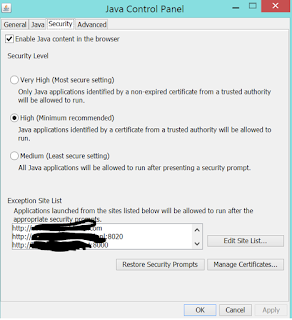
Ofcourse you have to allow for popups and in some cases you still have to open the URL using Ctrl- to avoid the popups being blocked ..
Choose the settings, InternetOptions, tabpage Privacy. You can still have popup-blocking except for a list of sites. Add your site to this list if necessary.

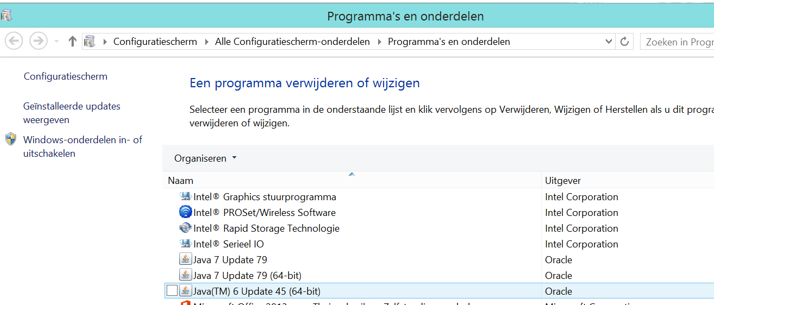

I have Java7 installed, both 32 and 64 bit version (ignore the dutch in the picture). Then under internet options you add your websites to trusted websites.

At Configure Java (from version 7) you have to Enable Java and configure the exception site list.

Ofcourse you have to allow for popups and in some cases you still have to open the URL using Ctrl- to avoid the popups being blocked ..
Choose the settings, InternetOptions, tabpage Privacy. You can still have popup-blocking except for a list of sites. Add your site to this list if necessary.

woensdag 18 november 2015
eBS R12 Install Custom Forms
To generate a form you must make sure the $AU_TOP/forms/US is included in your forms path, because it points to APPSTAND.fmb which is used in your form for all layout. If you forget this your form looks "scrambled" in the application. So add this to your host script for example.
The installation dir is your top directory, for example $XXYY_TOP.
echo "Generating forms .. please be patient .."
echo "Generate Forms" >> $LOGFILE
FORMS_PATH=$AU_TOP/forms/US:$FORMS_PATH
export FORMS_PATH
frmcmp_batch $INSTALLATION_DIR/forms/US/MYFORM $APPS_USER/$APPS_PASS batch=Y >> $LOGFILE
The installation dir is your top directory, for example $XXYY_TOP.
echo "Generating forms .. please be patient .."
echo "Generate Forms" >> $LOGFILE
FORMS_PATH=$AU_TOP/forms/US:$FORMS_PATH
export FORMS_PATH
frmcmp_batch $INSTALLATION_DIR/forms/US/MYFORM $APPS_USER/$APPS_PASS batch=Y >> $LOGFILE
ebs R11/R12 Install BI Publisher Templates
To upload the XML and RTF (see also other install scripts) you can use the following. Note that you can set language and territory as necessary (us/nl for example).
INSTALLATION_DIR=$XXX_TOP
CURRENTDIR=`pwd`
LOGFILE=$CURRENTDIR/MODULE_${INSTALL_DATE}.log
PORT_NR=$(tnsping ${TWO_TASK} | grep PORT \
| sed 's/^.*PORT=//g' | sed 's/).*//g')
DB_NAME=$(tnsping ${TWO_TASK} | grep HOST \
| sed 's/^.*HOST=//g' | sed 's/).*//g')
echo "Database machine "$DB_NAME":"$PORT_NR
#2 UPLOAD XML
java oracle.apps.xdo.oa.util.XDOLoader UPLOAD \
-DB_USERNAME $APPS_USER \
-DB_PASSWORD $APPS_PASS \
-JDBC_CONNECTION $DB_NAME:$PORT_NR:$TWO_TASK \
-LOB_TYPE DATA_TEMPLATE \
-APPS_SHORT_NAME XXX \
-LOB_CODE MYFILE \
-LANGUAGE nl \
-TERRITORY 00 \
-NLS_LANG American_America.WE8ISO8859P1 \
-XDO_FILE_TYPE XML-DATA-TEMPLATE \
-FILE_CONTENT_TYPE 'text/html' \
-FILE_NAME $INSTALLATION_DIR/install/rtf/MYFILE.xml >> $LOGFILE
#3 UPLOAD RTF
java oracle.apps.xdo.oa.util.XDOLoader UPLOAD \
-DB_USERNAME $APPS_USER \
-DB_PASSWORD $APPS_PASS \
-JDBC_CONNECTION $DB_NAME:$PORT_NR:$TWO_TASK \
-LOB_TYPE TEMPLATE_SOURCE \
-APPS_SHORT_NAME XXX \
-LOB_CODE MYFILE \
-LANGUAGE nl \
-TERRITORY 00 \
-NLS_LANG American_America.WE8ISO8859P1 \
-XDO_FILE_TYPE RTF \
-FILE_CONTENT_TYPE 'text/html' \
-FILE_NAME $INSTALLATION_DIR/install/rtf/MYFILE.rtf >> $LOGFILE
Init
INSTALLATION_DIR=$XXX_TOP
CURRENTDIR=`pwd`
LOGFILE=$CURRENTDIR/MODULE_${INSTALL_DATE}.log
PORT_NR=$(tnsping ${TWO_TASK} | grep PORT \
| sed 's/^.*PORT=//g' | sed 's/).*//g')
DB_NAME=$(tnsping ${TWO_TASK} | grep HOST \
| sed 's/^.*HOST=//g' | sed 's/).*//g')
echo "Database machine "$DB_NAME":"$PORT_NR
Upload XML
#2 UPLOAD XML
java oracle.apps.xdo.oa.util.XDOLoader UPLOAD \
-DB_USERNAME $APPS_USER \
-DB_PASSWORD $APPS_PASS \
-JDBC_CONNECTION $DB_NAME:$PORT_NR:$TWO_TASK \
-LOB_TYPE DATA_TEMPLATE \
-APPS_SHORT_NAME XXX \
-LOB_CODE MYFILE \
-LANGUAGE nl \
-TERRITORY 00 \
-NLS_LANG American_America.WE8ISO8859P1 \
-XDO_FILE_TYPE XML-DATA-TEMPLATE \
-FILE_CONTENT_TYPE 'text/html' \
-FILE_NAME $INSTALLATION_DIR/install/rtf/MYFILE.xml >> $LOGFILE
Upload RTF
#3 UPLOAD RTF
java oracle.apps.xdo.oa.util.XDOLoader UPLOAD \
-DB_USERNAME $APPS_USER \
-DB_PASSWORD $APPS_PASS \
-JDBC_CONNECTION $DB_NAME:$PORT_NR:$TWO_TASK \
-LOB_TYPE TEMPLATE_SOURCE \
-APPS_SHORT_NAME XXX \
-LOB_CODE MYFILE \
-LANGUAGE nl \
-TERRITORY 00 \
-NLS_LANG American_America.WE8ISO8859P1 \
-XDO_FILE_TYPE RTF \
-FILE_CONTENT_TYPE 'text/html' \
-FILE_NAME $INSTALLATION_DIR/install/rtf/MYFILE.rtf >> $LOGFILE
dinsdag 17 november 2015
ebS R11/R12 FNDLOAD examples
Here are some examples for FNDLOAD to load configuration into your system. Note that you can use the library routine FNDLOAD as described in the previous post, but the complete command is given here to make it more clear.
I use user APPS and password APPS everywhere, but ofcourse you make that flexible or change it to your environment.
Change {xxx} into the element you have downloaded.
cat L*.log >> $LOGFILE
rm -f L*.log
cat L*.log >> $LOGFILE
rm -f L*.log
cat L*.log >> $LOGFILE
rm -f L*.log
cat L*.log >> $LOGFILE
rm -f L*.log
$FND_TOP/bin/FNDLOAD $APPS_USER/$APPS_PASS 0 Y UPLOAD $FND_TOP/patch/115/import/afmdmsg.lct $INSTALLATION_DIR/install/ldt/MSG_{xxx}_NL.ldt
cat L*.log >> $LOGFILE
rm -f L*.log
cat L*.log >> $LOGFILE
rm -f L*.log
cat L*.log >> $LOGFILE
rm -f L*.log
"
cat L*.log >> $LOGFILE
rm -f L*.log
cat L*.log >> $LOGFILE
rm -f L*.log
cat L*.log >> $LOGFILE
rm -f L*.log
cat L*.log >> $LOGFILE
rm -f L*.log
I use user APPS and password APPS everywhere, but ofcourse you make that flexible or change it to your environment.
Change {xxx} into the element you have downloaded.
Profile options
Download
FNDLOAD apps/apps O Y DOWNLOAD $FND_TOP/patch/115/import/afscprof.lct PROFILE_$1.ldt PROFILE PROFILE_NAME="$1" APPLICATION_SHORT_NAME="$2"Upload
$FND_TOP/bin/FNDLOAD $APPS_USER/$APPS_PASS 0 Y UPLOAD $FND_TOP/patch/115/import/afscprof.lct $INSTALLATION_DIR/install/ldt/PROFILE_{xxx}.ldtcat L*.log >> $LOGFILE
rm -f L*.log
Concurrent Programs
Download
FNDLOAD apps/apps O Y DOWNLOAD $FND_TOP/patch/115/import/afcpprog.lct CP_$1.ldt PROGRAM APPLICATION_SHORT_NAME="$2" CONCURRENT_PROGRAM_NAME="$1"Upload
$FND_TOP/bin/FNDLOAD $APPS_USER/$APPS_PASS 0 Y UPLOAD $FND_TOP/patch/115/import/afcpprog.lct $INSTALLATION_DIR/install/ldt/CP_{xxx}.ldt UPLOAD_MODE=REPLACE CUSTOM_MODE=FORCEcat L*.log >> $LOGFILE
rm -f L*.log
Lookups
Important: Make sure you download all languages if you have multiple languages installed.Download
FNDLOAD apps/apps O Y DOWNLOAD $FND_TOP/patch/115/import/aflvmlu.lct LK_$1.ldt FND_LOOKUP_TYPE APPLICATION_SHORT_NAME="$2" LOOKUP_TYPE="$1"Upload
$FND_TOP/bin/FNDLOAD $APPS_USER/$APPS_PASS 0 Y UPLOAD $FND_TOP/patch/115/import/aflvmlu.lct $INSTALLATION_DIR/install/ldt/LK_{xxx}.ldtcat L*.log >> $LOGFILE
rm -f L*.log
Messages
Important: Make sure you download all languages if you have multiple languages installed.Download
FNDLOAD apps/apps O Y DOWNLOAD $FND_TOP/patch/115/import/afmdmsg.lct MSG_$1_US.ldt FND_NEW_MESSAGES APPLICATION_SHORT_NAME="$2" MESSAGE_NAME="$1"Upload
$FND_TOP/bin/FNDLOAD $APPS_USER/$APPS_PASS 0 Y UPLOAD $FND_TOP/patch/115/import/afmdmsg.lct $INSTALLATION_DIR/install/ldt/MSG_{xxx}_US.ldtcat L*.log >> $LOGFILE
rm -f L*.log
$FND_TOP/bin/FNDLOAD $APPS_USER/$APPS_PASS 0 Y UPLOAD $FND_TOP/patch/115/import/afmdmsg.lct $INSTALLATION_DIR/install/ldt/MSG_{xxx}_NL.ldt
cat L*.log >> $LOGFILE
rm -f L*.log
Valuesets
Download
$FND_TOP/bin/FNDLOAD apps/apps 0 Y DOWNLOAD $FND_TOP/patch/115/import/afffload.lct $1.ldt VALUE_SET FLEX_VALUE_SET_NAME="$1"Upload
$FND_TOP/bin/FNDLOAD $APPS_USER/$APPS_PASS 0 Y UPLOAD $FND_TOP/patch/115/import/afffload.lct $INSTALLATION_DIR/install/ldt/VS_{xxx}.ldt - WARNING=YES UPLOAD_MODE=REPLACE CUSTOM_MODE=FORCEcat L*.log >> $LOGFILE
rm -f L*.log
Form Functions
Note that if you download a menu you download forms and functions with it.Download
FNDLOAD apps/apps 0 Y DOWNLOAD $FND_TOP/patch/115/import/afsload.lct F_$1.ldt FUNCTION FUNCTION_NAME="$1"Upload
$FND_TOP/bin/FNDLOAD $APPS_USER/$APPS_PASS 0 Y UPLOAD $FND_TOP/patch/115/import/afsload.lct $INSTALLATION_DIR/install/ldt/F_{xxx}.ldt - WARNING=YES UPLOAD_MODE=REPLACE CUSTOM_MODE=FORCEcat L*.log >> $LOGFILE
rm -f L*.log
Descriptive Flexfields
Download
$FND_TOP/bin/FNDLOAD apps/apps 0 Y DOWNLOAD $FND_TOP/patch/115/import/afffload.lct DFF_$1.ldt DESC_FLEX APPLICATION_SHORT_NAME=$2 DESCRIPTIVE_FLEXFIELD_NAME=$1"
Upload
$FND_TOP/bin/FNDLOAD $APPS_USER/$APPS_PASS 0 Y UPLOAD $FND_TOP/patch/115/import/afffload.lct $INSTALLATION_DIR/install/ldt/DFF_{xxx}.ldtcat L*.log >> $LOGFILE
rm -f L*.log
Form Personalizations
Download
FNDLOAD apps/apps 0 Y DOWNLOAD $FND_TOP/patch/115/import/affrmcus.lct PERS_$1.ldt FND_FORM_CUSTOM_RULES function_name=$1Upload
$FND_TOP/bin/FNDLOAD $APPS_USER/$APPS_PASS 0 Y UPLOAD $FND_TOP/patch/115/import/affrmcus.lct $INSTALLATION_DIR/install/ldt/PERS_{xxx}.ldtcat L*.log >> $LOGFILE
rm -f L*.log
BI Publisher Templates
Download
FNDLOAD apps/apps 0 Y DOWNLOAD $XDO_TOP/patch/115/import/xdotmpl.lct XML_$1.ldt XDO_DS_DEFINITIONS APPLICATION_SHORT_NAME="$2" DATA_SOURCE_CODE="$1"Upload
$FND_TOP/bin/FNDLOAD $APPS_USER/$APPS_PASS 0 Y UPLOAD $XDO_TOP/patch/115/import/xdotmpl.lct $INSTALLATION_DIR/install/ldt/XML_{xxx}.ldtcat L*.log >> $LOGFILE
rm -f L*.log
Menu's
Note: It automatically downloads submenu's.Download
FNDLOAD apps/apps O Y DOWNLOAD $FND_TOP/patch/115/import/afsload.lct MENU_$1.ldt MENU MENU_NAME="$1"Upload
$FND_TOP/bin/FNDLOAD $APPS_USER/$APPS_PASS 0 Y UPLOAD $FND_TOP/patch/115/import/afsload.lct $INSTALLATION_DIR/install/ldt/MENU_{xxx}.ldtcat L*.log >> $LOGFILE
rm -f L*.log
eBS R11/R12 Installation Host Script Library
Library
On installation of eBS customizations you usually create a driver to install the software. The following library makes the installation easier by using a library for installation.#!/bin/ksh
##########################################################################
# (c) 2015 Your company
##########################################################################
#
# FILENAME : XXX_INSTALL.LIB
# DESCRIPTION : Libraries for shell functions for install scripts
# USAGE : This file must be sourced into the installation driver
# script; all functions are SHARED and hence can be
# maintained in a single location: this library.
# NOTE : This shellscript contains a SMALL executable section
# for initialization purposes.
# place this file in: $XXX_TOP/install/driver/
#
# PARAMETERS
# ==========
# $1 - Mandatory base dir for logging --> ${1}/log
# $2 - Mandatory filename-prefix for logging
# $3 - Mandatory minimum library revision number
#
##########################################################################
# Define GLOBAL variables
_INSTALL_DATE=`date +%Y%m%d_%H%M%S`
_REVISION=$(echo '$Revision: 115 $' | sed '/^/s/[^0-9]//g')
LIBRARY_REVISION=${_REVISION:-0}
LIBRARY_NAME=$(basename $0)
LIBRARY_ERROR_COUNT=0
# GLOBALS TO BE INHERITED
# APPS_USER/APPS_PASS/XXX_USER/XXX_PASS
#
# Define configuration variables
FNDLOAD_CONFIG1=$FND_TOP/patch/115/import
FNDLOAD_CONFIG2=$FND_TOP/admin/import
XDOLOAD_CONFIG=$XDO_TOP/patch/115/import
##################################################################
# START-LIBRARY-FUNCTIONS
##################################################################
# -----------------------------------------------------------------
# Function : verify_invocation
# Purpose : Check script is invoked with correct parameters
# and the library meets the minimum revision requirements
# Parameters : All invocation parameters to this script are passed
# -----------------------------------------------------------------
verify_invocation()
{
if [ $# -ne 3 ]; then
echo
echo "Usage ${0} CUSTOM_TOP logfilename-include min-library-revision"
exit 1
fi
if [ $LIBRARY_REVISION -lt $3 ]; then
echo "Version of LIBRARY ($LIBRARY_REVISION) must be >= $3"
exit 2
fi
}
# -----------------------------------------------------------------
# Function : init_logging
# Purpose : Initialize logging, create logfilename
# Parameters : $1 = BASEDIR for installation
# $2 = name to include in logfilename
# -----------------------------------------------------------------
init_logging()
{
if [ -n $1 ]; then
LOGDIR=${1}/log
if [ ! -d ${LOGDIR} ]; then
mkdir ${LOGDIR}
fi
LOGFILE=${LOGDIR}/${2}_${_INSTALL_DATE}.log
fi
}
# -----------------------------------------------------------------
# Function : out
# Purpose : Write to stdout and tee to logfile; should be used
# for almost all output
# Parameters : $* = messages to output
# -----------------------------------------------------------------
out()
{
echo "$*" | tee -a ${LOGFILE}
}
# -----------------------------------------------------------------
# Function : do_sql_file
# Purpose : Execute sql script using sqlplus
# Parameters :
# ${1}: The un/pw@connect_string to use when connecting (default "/ as sysdba")
# ${2}: The SQL script to execute.
# ${3}: database (optioneel)
# Results :
# 0 ok
# >0 error
# -----------------------------------------------------------------
do_sql_file()
{
#
do_banner "Starting sqlplus script ${2}"
out "Starting sqlplus script ${2} at `date +%d%m%Y_%H%M%S`"
p_un_pw_connect=${1}
p_SQL=${2}
OUT_FILE=/tmp/$$.do_SQL.lst
# temporary file CREATION, FILENAME en parameters isoleren, nieuwe p_sql
# maken en exit toevoegen
TMP_IN_FILE=/tmp/$$.sql
#
echo $p_SQL > /tmp/$$.argumenten
#
while read sqlfile parameters
do
SQL_FILE=$sqlfile
PARAMETERS=$parameters
done < /tmp/$$.argumenten
#
rm /tmp/$$.argumenten
#
echo "set serveroutput on size 300000" > ${TMP_IN_FILE}
echo " " >> ${TMP_IN_FILE}
cat ${SQL_FILE} >> ${TMP_IN_FILE}
echo " " >> ${TMP_IN_FILE}
echo "exit" >> ${TMP_IN_FILE}
echo "" >> ${TMP_IN_FILE}
#
# temporary file opstarten
${ORACLE_HOME}/bin/sqlplus -s $p_un_pw_connect @$TMP_IN_FILE ${PARAMETERS} | tee -a $LOGFILE
l_rc=${?}
[[ ${l_rc} -ne 0 ]] && echo "SQL statement \"${p_SQL}\" returned error code ${l_rc} instead of 0."
return ${l_rc}
# temporary file
rm ${TMP_IN_FILE}
ENDTIME=$(date +%s)
let TIMEDIFF=$ENDTIME-$STARTTIME
out "Finished sqlplus script ${2} at `date +%d%m%Y_%H%M%S`"
out "Executed in $TIMEDIFF seconds"
}
# -----------------------------------------------------------------
# Function : do_banner
# Purpose : Generate banner to stdout & logfile
# Parameters : $@ = banner text
# -----------------------------------------------------------------
do_banner()
{
out ""
out " ==================================================="
out " " "$@"
out " ==================================================="
}
do_error()
{
let LIBRARY_ERROR_COUNT=LIBRARY_ERROR_COUNT+1
do_banner " **** ERROR COUNT = ${LIBRARY_ERROR_COUNT} ****"
}
# -----------------------------------------------------------------
# Function : determine_db_params
# Purpose : Determine database parameters based on current
# TWO_TASK variable; useful for Java loaders
# -----------------------------------------------------------------
determine_db_params()
{
DB_PORT=$(tnsping ${TWO_TASK} | grep PORT \
| sed 's/^.*PORT=//g' | sed 's/).*//g')
DB_HOST=$(tnsping ${TWO_TASK} | grep HOST \
| sed 's/^.*HOST=//g' | sed 's/).*//g')
_SID=$(tnsping ${TWO_TASK} | grep SID \
| sed 's/^.*SID=//g' | sed 's/).*//g')
DB_SID=${_SID:=$TWO_TASK}
}
# -----------------------------------------------------------------
# Function : wfload
# Purpose : Upload workflow process definitions to target DB
# Parameters : $1 - workflow file to be uploaded
# $2 - mode (should be specified as UPLOAD OR UPGRADE)
# $3 - wf access level [default: 100]
# -----------------------------------------------------------------
wfload()
{
do_banner "Uploading Workflow"
# bail out if incorrect number of parameters supplied on command line
if [[ $# -lt 1 || $# -gt 3 ]]; then
do_error "Incorrect number of parameters in invocation of wfload()"
out "wfload $*"
return
fi
save_wf_access_level=$WF_ACCESS_LEVEL
case $# in
3) export WF_ACCESS_LEVEL=$3 # need to fall thru !
WFLOAD_OPTION=$2
;;
2) WFLOAD_OPTION=$2
export WF_ACCESS_LEVEL=100
;;
1) export WF_ACCESS_LEVEL=100
WFLOAD_OPTION=DOWNLOAD
;;
esac
out "WFLOAD mode: $WFLOAD_OPTION (Access Level=$WF_ACCESS_LEVEL) File=$1"
( WFLOAD $APPS_USER/$APPS_PASS 0 Y $WFLOAD_OPTION $1 2>&1) \
1> wfload.$$
WFLOAD_LOGFILE=`grep -i log wfload.$$ | awk -F: '{print $2}' | sed 's/ *//'`
out Command output of upload workflow $1
cat wfload.$$ | tee -a $LOGFILE
out Logfile of upload workflow $1
cat $WFLOAD_LOGFILE >> $LOGFILE
# cleanup after each use
rm $WFLOAD_LOGFILE 2>&1 1>/dev/null
rm wfload.$$
export WF_ACCESS_LEVEL=$save_wf_access_level
}
##################################################################
# Upload AOL entity to the database
# Usage: fndload loader_config_file.lct loader_data_file.ldt
# Note: loader config is a relative filename, loader data is an absolute name
##################################################################
fndload()
{
do_banner "FNDLOAD: Uploading AOL/application entity definitions"
if [ -r $FNDLOAD_CONFIG1/$1 ]
then LOADER_CONFIG=$FNDLOAD_CONFIG1/$1
elif [ -r $FNDLOAD_CONFIG2/$1 ]
then
LOADER_CONFIG=$FNDLOAD_CONFIG2/$1
elif [ -r $XDOLOAD_CONFIG/$1 ]
then
LOADER_CONFIG=$XDOLOAD_CONFIG/$1
fi
echo Configuratie file: $LOADER_CONFIG | tee -a $LOGFILE
echo Loader file : $2 | tee -a $LOGFILE
( FNDLOAD $APPS_USER/$APPS_PASS 0 Y UPLOAD $LOADER_CONFIG $2 \
- UPLOAD_MODE=REPLACE CUSTOM_MODE=FORCE 2>&1) 1> fndload.$$
FNDLOAD_LOGFILE=`grep -i log fndload.$$ | awk -F: '{print $2}' | sed 's/ *//'`
cat fndload.$$ | tee -a $LOGFILE
# cleanup after each usage
cat $FNDLOAD_LOGFILE >> $LOGFILE
rm $FNDLOAD_LOGFILE 2>&1 1>/dev/null
rm fndload.$$
}
# -----------------------------------------------------------------
# Function : complib
# Purpose : Compile forms library (PLL) into runtime file (PLX)
# Parameters : $1 = name of form module (excluding extension)
# Results : .plx file will be in same directory as .pll file
# -----------------------------------------------------------------
complib()
{
do_banner "Compiling library ${1}"
# initialize environment
SAVE_FORMS_PATH=$FORMS_PATH
FORMS_PATH=${SAVE_FORMS_PATH}:${AU_TOP}/resource
out "Compiling library ${1}"
STARTTIME=$(date +%s)
( frmcmp_batch Module=${1} Userid=$APPS_USER/$APPS_PASS \
Module_Type=LIBRARY Compile_All=Yes 2>&1) | tee -a $LOGFILE
# finalize: report and reset environment
ENDTIME=$(date +%s)
let TIMEDIFF=$ENDTIME-$STARTTIME
out "Finished library ${1} at `date +%d%m%Y_%H%M%S`"
out "Compiled in $TIMEDIFF seconds"
FORMS_PATH=$SAVE_FORMS_PATH
}
# -----------------------------------------------------------------
# Function : compfrm
# Purpose : Compile form definition into runtime file
# Parameters : $1 = name of form module (excluding extension, including $XXX_TOP/forms/NL or US)
# $2 = language of form module
# Results : .fmx file will be in same directory as .fmb file
# -----------------------------------------------------------------
compfrm()
{
do_banner "Compiling form ${2}/${1}"
# save current forms path and append correct language directory
SAVE_FORMS_PATH=$FORMS_PATH
FORMS_PATH=${SAVE_FORMS_PATH}:${AU_TOP}/${2}
out "Compiling form ${1} language $2 at `date +%d%m%Y_%H%M%S`"
# cd added for compilation from correct directorie
cd $AU_TOP/forms/$2
STARTTIME=$(date +%s)
( frmcmp_batch Module=${1} Userid=$APPS_USER/$APPS_PASS \
Module_Type=FORM Compile_All=Yes 2>&1) | tee -a $LOGFILE
# finalize: report and reset environment
ENDTIME=$(date +%s)
let TIMEDIFF=$ENDTIME-$STARTTIME
out "Finished form ${1} language ${2} at `date +%d%m%Y_%H%M%S`"
out "Compiled in $TIMEDIFF seconds"
FORMS_PATH=$SAVE_FORMS_PATH
# back to initial directorie
cd -
}
# -----------------------------------------------------------------
# Function : xdoload
# Purpose : Loader for XML Publisher (Data) Templates
# Parameters : $1 = Template filename
# $2 = Lob Type (TEMPLATE/DATA_TEMPLATE/BURSTING_FILE/XML_SAMPLE)
# $3 = Template Application Short Name (Owning application)
# $4 = Template language
# $5 = Template territory
# $6 = Template file type (PDF, RTF, XSL-FO, ...)
# $7 = Lob code equal to data definition name
# Results : XML Publisher template is uploaded in DB
# ** NOTE: XMLP also requires UPLOADING LDT files
# for the complete definition !
# -----------------------------------------------------------------
xdoload()
{
do_banner "Uploading XML Publisher Template"
# determine_db_params
out "Filename : ${1}"
out "Lob-type : ${2}"
out "Template owner : ${3}"
out "Language : ${4}"
out "Territory : ${5}"
out "Template file type : ${6}"
out "Lob-Code : ${7}"
out "Destination-host : ${DB_HOST}"
out "Destination-port : ${DB_PORT}"
out "Destination-SID : ${DB_SID}"
XDO_LOGFILE=XDO_${1}_${3}_${4}.log
STARTTIME=$(date +%s)
java oracle.apps.xdo.oa.util.XDOLoader UPLOAD \
-DB_USERNAME ${APPS_USER} \
-DB_PASSWORD ${APPS_PASS} \
-JDBC_CONNECTION ${DB_HOST}:${DB_PORT}:${DB_SID} \
-LOB_CODE ${7} \
-LOB_TYPE ${2} \
-APPS_SHORT_NAME ${3} \
-LANGUAGE ${4} \
-TERRITORY ${5} \
-XDO_FILE_TYPE ${6} \
-NLS_LANG ${NLS_LANG} \
-FILE_NAME ${1} \
-CUSTOM_MODE FORCE \
-LOGFILE ${XDO_LOGFILE} | tee -a ${LOGFILE}
ENDTIME=$(date +%s)
let TIMEDIFF=$ENDTIME-$STARTTIME
( cat ${XDO_LOGFILE} | tee -a ${LOGFILE} ) 2>/dev/null
out "Uploaded template ${1} in ${TIMEDIFF} seconds"
rm ${XDO_LOGFILE} 2>/dev/null
}
# -----------------------------------------------------------------
# Function : xdodownload
# Purpose : DOWNLoader for XML Publisher (Data) Templates
# Parameters : $1 = Lob Type (TEMPLATE/DATA_TEMPLATE/BURSTING_FILE/XML_SAMPLE)
# $2 = Template Application Short Name (Owning application)
# $3 = Template language
# $4 = Template territory
# Results : XML Publisher template is downloaded from DB
# -----------------------------------------------------------------
xdodownload()
{
do_banner "Downloading XML Publisher Templates"
# determine_db_params
out "Lob-type : ${1}"
out "Template owner : ${2}"
out "Language : ${3}"
out "Territory : ${4}"
out "Destination-host : ${DB_HOST}"
out "Destination-port : ${DB_PORT}"
out "Destination-SID : ${DB_SID}"
XDO_LOGFILE=XDO_${1}_${2}.log
STARTTIME=$(date +%s)
java oracle.apps.xdo.oa.util.XDOLoader DOWNLOAD \
-DB_USERNAME ${APPS_USER} \
-DB_PASSWORD ${APPS_PASS} \
-JDBC_CONNECTION ${DB_HOST}:${DB_PORT}:${DB_SID} \
-LOB_TYPE ${1} \
-APPS_SHORT_NAME ${2} \
-LANGUAGE ${3} \
-TERRITORY ${4} \
-CUSTOM_MODE FORCE \
-LOGFILE ${XDO_LOGFILE} | tee -a ${LOGFILE}
ENDTIME=$(date +%s)
let TIMEDIFF=$ENDTIME-$STARTTIME
( cat ${XDO_LOGFILE} | tee -a ${LOGFILE} ) 2>/dev/null
out "Downloaded template ${1} in ${TIMEDIFF} seconds"
rm ${XDO_LOGFILE} 2>/dev/null
}
# -----------------------------------------------------------------
# Function : generate_msg
# Purpose : Generate message runtime file for application
# Parameters : $1 = Application Short name
# $2 = Language
# -----------------------------------------------------------------
generate_msg()
{
do_banner "Generating message file for ${1}"
( FNDMDGEN ${APPS_USER}/${APPS_PASS} 0 Y \
${2} ${1} DB_TO_RUNTIME 2>&1) 1> fndmdgen.$$
# extract name of logfile from loader's output
FNDMDGEN_LOGFILE=`grep -i log fndmdgen.$$ | awk -F: '{print $2}' | sed 's/ *//'`
cat fndmdgen.$$ | tee -a ${LOGFILE}
# cleanup after each usage
cat ${FNDMDGEN_LOGFILE} >> ${LOGFILE}
rm ${FNDMDGEN_LOGFILE} 2>&1 1>/dev/null
rm fndmdgen.$$ 2>/dev/null
}
# -----------------------------------------------------------------
# Function : oaf_substitutions
# Purpose : Loader for OAF BC4J substitutions
# Parameters : $1 = JPX-filename (full path)
# -----------------------------------------------------------------
oaf_vo_substitutions()
{
do_banner "Uploading OAF BC4J substitutions"
determine_db_params
out "Filename : ${1}"
out "Destination-host : ${DB_HOST}"
out "Destination-port : ${DB_PORT}"
out "Destination-SID : ${DB_SID}"
STARTTIME=$(date +%s)
( java oracle.jrad.tools.xml.importer.JPXImporter ${1} \
-username ${APPS_USER} -password ${APPS_PASS} \
-dbconnection ${DB_HOST}:${DB_PORT}:${DB_SID} 2>&1 ) | tee -a ${LOGFILE}
ENDTIME=$(date +%s)
let TIMEDIFF=$ENDTIME-$STARTTIME
( cat ${XDO_LOGFILE} | tee -a ${LOGFILE} ) 2>/dev/null
out "Uploaded template ${1} in ${TIMEDIFF} seconds"
rm ${XDO_LOGFILE} 2>/dev/null
}
# -----------------------------------------------------------------
# Function : check_login
# Purpose : Check that login credentials are valid
# Parameters : $1 = USERNAME
# $2 = PASSWORD
# Returns 0 upon successful login, <>0 otherwise
# -----------------------------------------------------------------
check_login()
{
if (( $# != 3 ))
then
DATABASE=$TWO_TASK
else
DATABASE=${3}
fi
sqlplus -s /nolog <<EOFSQLPLUS >/dev/null 2>&1
WHENEVER SQLERROR EXIT 1;
CONNECT ${1}/${2}@${DATABASE};
SELECT * FROM DUAL;
EXIT;
EOFSQLPLUS
if [ $? -eq 0 ]; then
out "Login credentials for ${1} are valid"
# echo "Login credentials for ${1} are valid"
return 0
else
out "Login credentials for ${1} are *INVALID*"
# echo "Login credentials for ${1} are *INVALID*"
return 1
fi
}
# -----------------------------------------------------------------
# Function : prompt_parameter
# Purpose : Prompt user for parameter
# Parameters : $1 = Prompt
# $2 = Return-variable name
# $3 = (Optional) HIDE/NOHIDE (NOHIDE is default)
# $4 = (Optional) Default value for return variable
# Prompt user for parameter, returning the value in the indicated
# variable. Optionally, the parameter value is HIDDEN during
# entry (e.g. for passwords)
# -----------------------------------------------------------------
prompt_parameter()
{
print -n ${1}
if [ ! -z "$4" ]; then
print -n " [$4]: "
else
print -n ": "
fi
# Turn off echoing if required
if [ "$3" == "HIDE" ]; then
stty -echo
else
stty echo
fi
read PARAMETER_VALUE
stty echo
print ""
eval export ${2}=${PARAMETER_VALUE:-$4}
}
##################################################################
# END-OF-LIBRARY
##################################################################
##################################################################
# START-OF-EXECUTABLE-SECTION
##################################################################
# Verify calling this LIBRARY: are the correct parameters passed ?
verify_invocation "$@"
# Initialize logging
init_logging ${1} ${2}
clear
out "Installation logged in ${LOGFILE}"
Installation driver
The installation driver itself will then be something like this including the library so you can use routines from the library itself.#!/bin/ksh
##########################################################################
# (c) 2015 Your company
##########################################################################
#
# FILENAME : xxx_{module}.sh
# AUTHOR : {Author}
# DESCRIPTION : Installation driver for {module}
#
# *NOTE* This version assumes an e-Business Suite 12.1.3
# or later
# DATE : dd-mm-yyyy
# MODULE(S) : XXPV
# USAGE : Run the shellscript from the shell prompt after the
# environment setting have been sourced into the session
#
# PARAMETERS : Are all prompted for
#
# CHANGE HISTORY
# ==============
#
# Date Authors Change reference/Description
# ------------------ -------------------- ---------------------------------------
# dd-mm-yyyy {Author} Initial Creation
#
##########################################################################
# Define variables
INSTALL_DATE=`date +%Y%m%d_%H%M%S`
FNDLOAD_CONFIG1=$FND_TOP/patch/115/import
FNDLOAD_CONFIG2=$FND_TOP/install/import
# Edit variables below
ZIP_FILE=xxpv_{module}.zip
INSTALLATION_DIR=$XXX_TOP
CURRENTDIR=`pwd`
LOGFILE=$CURRENTDIR/XXX_{module}_${INSTALL_DATE}.log
CUSTOMIZATION_NAME={module name}
export CUSTOMIZATION_NAME
# LOAD LIBRARY INSTALLATION ROUTINES
. ${ INSTALLATION_DIR}/install/driver/XXX_INSTALL.LIB ${INSTALLATION_DIR} ${CUSTOMIZATION_NAME} 1
##################################################################
# Start of program
##################################################################
clear
echo "" > $LOGFILE # empty logfile
do_banner "Start installation at `date`"
# prompt for all parameters
test -z "$APPS_USER" && prompt_parameter "APPS Username" APPS_USER NOHIDE APPS
test -z "$APPS_PASS" && prompt_parameter "APPS Password" APPS_PASS HIDE
test -z "$XXX_USER" && prompt_parameter "Custom Username" XXX_USER NOHIDE
test -z "$XXX_PASS" && prompt_parameter "Custom Password" XXX_PASS HIDE
check_login ${APPS_USER} ${APPS_PASS}
if [ $? -ne 0 ]; then
out "Incorrect APPS credentials .. exiting"
exit 1
fi
check_login ${XXX_USER} ${XXX_PASS}
if [ $? -ne 0 ]; then
out "Incorrect Custom credentials .. exiting"
exit 1
fi
if [ -f ${ZIP_FILE} ]
then
echo 'Expanding' ${ZIP_FILE}
else
echo 'No zip file '${ZIP_FILE}' present. Aborting installation.'
exit 1
fi
unzip -oa ${ZIP_FILE} >> $LOGFILE
echo >> $LOGFILE
echo "Installation" >> $LOGFILE
And finally start the actual installation from here.
donderdag 12 november 2015
Create table using dynamic sql
Create table using dynamic sql
When installing new tables for an eBS customization we have to install/re-install tables usually multiple times. Especially for re-usable products we like to install at multiple customers and sites you don't want all kinds of error messages in your installation script that the table already exists and you also do not want to create a CREATE and an UPDATE script for the same table. You simply want to be able to re-run the script without error messages and that keeps your tables up to date.
This dynamic sql script allows you to create the table and re-run it multiple times. If the columns already exist, it will not do anything and otherwise it adds the columns.
Table creation script
The initial script is for example something like this for a simple table with two columns. It assumes you create it under a custom user and grant it to APPS.CONNECT &&3/&&4
SET SERVEROUTPUT ON SIZE 1000000
SET LINESIZE 240
SET VERIFY OFF
SET FEEDBACK OFF
DECLARE
/****************************************************************************
-- HISTORY
-- ============ === ================ ========================================
-- 11 Jul 2015 1.0 P Koertshuis Created
****************************************************************************/
v_statement VARCHAR2(2000);
v_exists VARCHAR2(10);
v_tab_name VARCHAR2(80) := 'XXX_MY_TABLE';
v_version VARCHAR2(80) := '15.7.1 - 11-Jul-2015';
v_error VARCHAR2(240);
v_up_to_date VARCHAR2(240) := '... Table definition is up to date.';
v_release VARCHAR2(80) := '15.7.1';
v_release_date VARCHAR2(80) := '11-Jul-2015';
v_main_release VARCHAR2(80) := '15.7.1';
v_release_desc VARCHAR2(240) := 'Initial creation';
v_null VARCHAR2(1);
v_info VARCHAR2(240);
CURSOR C_Columns
IS
SELECT 1 Colnr,'ITEM_NUMBER' Column_Name,'ITEM_NUMBER VARCHAR2(100) NOT NULL' Column_Full FROM DUAL
UNION SELECT 2 Colnr,'ITEM_DESCRIPTION' Column_Name,'ITEM_DESCRIPTION VARCHAR2(100)' Column_Full FROM DUAL
ORDER BY 1
;
CURSOR C_Tab
IS
SELECT Column_Name
FROM ALL_TAB_COLUMNS
WHERE Table_Name = v_tab_name
AND Owner = upper ('&&3')
;
BEGIN
---------------------------------------------------------------------------------------------
-- Check whether table exists.
---------------------------------------------------------------------------------------------
SELECT ''
INTO v_exists
FROM ALL_TABLES
WHERE Table_Name = v_tab_name
AND Owner = upper ('&&3')
;
DBMS_OUTPUT.Put_Line ('Table ' || v_tab_name || ' exists. Updating table definition to ' || v_version);
---------------------------------------------------------------------------------------------
-- If exists, update table statement.
---------------------------------------------------------------------------------------------
FOR C IN C_Columns
LOOP
BEGIN
SELECT ''
INTO v_exists
FROM ALL_TAB_COLUMNS
WHERE Table_Name = v_tab_name
AND Upper (Column_Name) = Upper (C.Column_Name)
AND Owner = upper ('&&3')
;
EXCEPTION
WHEN No_Data_Found
THEN
BEGIN
v_statement := 'ALTER TABLE ' || v_tab_name || ' ADD ' || C.Column_Full;
DBMS_OUTPUT.Put_Line ('... Adding column ' || C.Column_Name);
v_up_to_date := NULL;
execute immediate (v_statement);
EXCEPTION
WHEN Others THEN
v_error := SQLERRM;
DBMS_OUTPUT.Put_Line ('Error on updating table ' || v_tab_name || ' with column ' || C.Column_Name || ': ' || v_error);
END;
WHEN Others THEN
v_error := SQLERRM;
DBMS_OUTPUT.Put_Line ('Error on finding column ' || C.Column_Name);
END;
END LOOP;
---------------------------------------------------------------------------------------------
-- Any additional updates
---------------------------------------------------------------------------------------------
/*
v_statement := 'UPDATE ' || v_tab_name ||
' SET MULTI_ORG_FLAG = ''N'' WHERE Org_Id IS NOT NULL AND NVL (MULTI_ORG_FLAG,''Y'') <> ''N'' ';
execute immediate (v_statement);
v_statement := 'UPDATE ' || v_tab_name ||
' SET MULTI_ORG_FLAG = ''Y'' WHERE Org_Id IS NULL AND NVL (MULTI_ORG_FLAG,''N'') <> ''Y'' ';
execute immediate (v_statement);
*/
---------------------------------------------------------------------------------------------
-- Check whether you are installing an older version ..
---------------------------------------------------------------------------------------------
FOR T IN C_Tab
LOOP
IF T.Column_Name NOT IN
('ITEM_NUMBER'
,'ITEM_DESCRIPTION')
THEN
DBMS_OUTPUT.Put_Line ('...Column ' || T.Column_Name || ' is defined in a newer version.');
v_up_to_date := '...Newer version of ' || v_tab_name || ' is already installed. Please uninstall and reinstall to make the module is working as expected.';
END IF;
END LOOP;
IF v_up_to_date IS NOT NULL
THEN
DBMS_OUTPUT.Put_Line (v_up_to_date);
END IF;
commit;
EXCEPTION
WHEN No_Data_Found THEN
BEGIN
---------------------------------------------------------------------------------------------
-- Create table.
---------------------------------------------------------------------------------------------
DBMS_OUTPUT.Put_Line ('Creating table ' || v_tab_name || ' version ' || v_version);
v_statement := 'CREATE TABLE ' || v_tab_name || Chr(10) || '(';
v_exists := ' ';
FOR C IN C_Columns
LOOP
v_statement := v_statement || v_exists || C.Column_Full;
v_exists := ' , ';
END LOOP;
v_statement := v_statement || ')';
execute immediate (v_statement);
commit;
EXCEPTION
WHEN Others tHEN
v_error := SQLERRM;
DBMS_OUTPUT.Put_Line ('Error on creating table ' || v_tab_name || ': ' || v_error);
END;
WHEN Others THEN
v_error := SQLERRM;
DBMS_OUTPUT.Put_Line ('Error on finding table ' || v_tab_name || ': ' || v_error);
END;
/
GRANT ALL ON XXX_MY_TABLE TO &&1;
PROMPT
Now while running it, it will also prompt you if you have a table in the system with more columns (a newer version exists). The blue parts are the bits you change if you change your table definition.
For example if you add a column the new script could be something like
CONNECT &&3/&&4
SET SERVEROUTPUT ON SIZE 1000000
SET LINESIZE 240
SET VERIFY OFF
SET FEEDBACK OFF
DECLARE
/****************************************************************************
-- HISTORY
-- ============ === ================ ========================================
-- 11 Jul 2015 1.0 P Koertshuis Created
****************************************************************************/
v_statement VARCHAR2(2000);
v_exists VARCHAR2(10);
v_tab_name VARCHAR2(80) := 'XXX_MY_TABLE';
v_version VARCHAR2(80) := '15.7.1 - 11-Jul-2015';
v_error VARCHAR2(240);
v_up_to_date VARCHAR2(240) := '... Table definition is up to date.';
v_release VARCHAR2(80) := '15.7.1';
v_release_date VARCHAR2(80) := '11-Jul-2015';
v_main_release VARCHAR2(80) := '15.7.1';
v_release_desc VARCHAR2(240) := 'Initial creation';
v_null VARCHAR2(1);
v_info VARCHAR2(240);
CURSOR C_Columns
IS
SELECT 1 Colnr,'ITEM_NUMBER' Column_Name,'ITEM_NUMBER VARCHAR2(100) NOT NULL' Column_Full FROM DUAL
UNION SELECT 2 Colnr,'ITEM_DESCRIPTION' Column_Name,'ITEM_DESCRIPTION VARCHAR2(100)' Column_Full FROM DUAL
UNION SELECT 3 Colnr, 'NEW_COLUMN' Column_Name,'NEW_COLUMN NUMBER NOT NULL' FROM DUAL
ORDER BY 1
;
CURSOR C_Tab
IS
SELECT Column_Name
FROM ALL_TAB_COLUMNS
WHERE Table_Name = v_tab_name
AND Owner = upper ('&&3')
;
BEGIN
---------------------------------------------------------------------------------------------
-- Check whether table exists.
---------------------------------------------------------------------------------------------
SELECT ''
INTO v_exists
FROM ALL_TABLES
WHERE Table_Name = v_tab_name
AND Owner = upper ('&&3')
;
DBMS_OUTPUT.Put_Line ('Table ' || v_tab_name || ' exists. Updating table definition to ' || v_version);
---------------------------------------------------------------------------------------------
-- If exists, update table statement.
---------------------------------------------------------------------------------------------
FOR C IN C_Columns
LOOP
BEGIN
SELECT ''
INTO v_exists
FROM ALL_TAB_COLUMNS
WHERE Table_Name = v_tab_name
AND Upper (Column_Name) = Upper (C.Column_Name)
AND Owner = upper ('&&3')
;
EXCEPTION
WHEN No_Data_Found
THEN
BEGIN
v_statement := 'ALTER TABLE ' || v_tab_name || ' ADD ' || C.Column_Full;
DBMS_OUTPUT.Put_Line ('... Adding column ' || C.Column_Name);
v_up_to_date := NULL;
execute immediate (v_statement);
EXCEPTION
WHEN Others THEN
v_error := SQLERRM;
DBMS_OUTPUT.Put_Line ('Error on updating table ' || v_tab_name || ' with column ' || C.Column_Name || ': ' || v_error);
END;
WHEN Others THEN
v_error := SQLERRM;
DBMS_OUTPUT.Put_Line ('Error on finding column ' || C.Column_Name);
END;
END LOOP;
---------------------------------------------------------------------------------------------
-- Any additional updates
---------------------------------------------------------------------------------------------
/*
v_statement := 'UPDATE ' || v_tab_name ||
' SET MULTI_ORG_FLAG = ''N'' WHERE Org_Id IS NOT NULL AND NVL (MULTI_ORG_FLAG,''Y'') <> ''N'' ';
execute immediate (v_statement);
v_statement := 'UPDATE ' || v_tab_name ||
' SET MULTI_ORG_FLAG = ''Y'' WHERE Org_Id IS NULL AND NVL (MULTI_ORG_FLAG,''N'') <> ''Y'' ';
execute immediate (v_statement);
*/
---------------------------------------------------------------------------------------------
-- Check whether you are installing an older version ..
---------------------------------------------------------------------------------------------
FOR T IN C_Tab
LOOP
IF T.Column_Name NOT IN
('ITEM_NUMBER'
,'ITEM_DESCRIPTION'
'NEW_COLUMN')
THEN
DBMS_OUTPUT.Put_Line ('...Column ' || T.Column_Name || ' is defined in a newer version.');
v_up_to_date := '...Newer version of ' || v_tab_name || ' is already installed. Please uninstall and reinstall to make the module is working as expected.';
END IF;
END LOOP;
IF v_up_to_date IS NOT NULL
THEN
DBMS_OUTPUT.Put_Line (v_up_to_date);
END IF;
commit;
EXCEPTION
WHEN No_Data_Found THEN
BEGIN
---------------------------------------------------------------------------------------------
-- Create table.
---------------------------------------------------------------------------------------------
DBMS_OUTPUT.Put_Line ('Creating table ' || v_tab_name || ' version ' || v_version);
v_statement := 'CREATE TABLE ' || v_tab_name || Chr(10) || '(';
v_exists := ' ';
FOR C IN C_Columns
LOOP
v_statement := v_statement || v_exists || C.Column_Full;
v_exists := ' , ';
END LOOP;
v_statement := v_statement || ')';
execute immediate (v_statement);
commit;
EXCEPTION
WHEN Others tHEN
v_error := SQLERRM;
DBMS_OUTPUT.Put_Line ('Error on creating table ' || v_tab_name || ': ' || v_error);
END;
WHEN Others THEN
v_error := SQLERRM;
DBMS_OUTPUT.Put_Line ('Error on finding table ' || v_tab_name || ': ' || v_error);
END;
/
GRANT ALL ON XXX_MY_TABLE TO &&1;
PROMPT
You can also create the script after you have created tables in the database already. In that case use the following code to extract the first part (the UNION) and the second part (the list of columns) and copy them into the script.
Extract unions
To extract the first part use this code. Remove the first union before you copy it into the script.SELECT 'UNION SELECT ' || rownum || ' Colnr,''' || column_name || ''' Column_Name,''' || column_Name || ' ' || data_type || decode (data_type,'DATE',null,'NUMBER', null,'(' || data_length || ')') ||
decode (nullable,'N',' NOT NULL ') || ''' Column_Full FROM DUAL'
FROM ALL_TAB_COLUMNS
WHERE TABLE_NAME = 'XXX_MY_TABLE'
;
Extract column list
SELECT ',''' || Column_Name || ''''FROM ALL_TAB_COLUMNS
WHERE TABLE_NAME = 'XXX_MY_TABLE'
;
Execution
To run the script simply use@XXX_MY_TABLE.tbl apps <appspwd> customuser <custompwd>
zondag 1 november 2015
Compile all invalid custom objects
Compile all invalid custom objects
I use this script on every installation of custom software to make sure all objects are compiled at the end.SET SERVEROUTPUT ON SIZE 1000000
SET TERM ON
SELECT Status, Object_Type, Object_Name
FROM ALL_OBJECTS
WHERE Status = 'INVALID'
AND Object_Type IN ('PACKAGE', 'PACKAGE BODY', 'VIEW')
;
BEGIN
FOR cur_rec IN (SELECT owner,
object_name,
object_type,
DECODE(object_type, 'PACKAGE', 1,
'PACKAGE BODY', 2, 3) AS recompile_order
FROM dba_objects
WHERE object_type IN ('PACKAGE', 'PACKAGE BODY','VIEW')
AND status != 'VALID'
AND (object_name like 'XX%'
)
ORDER BY 4)
LOOP
dbms_output.put_line ('Compiling ' || cur_rec.object_type || ' ' || cur_rec.object_name);
BEGIN
IF cur_rec.object_type = 'PACKAGE' THEN
EXECUTE IMMEDIATE 'ALTER ' || cur_rec.object_type ||
' "' || cur_rec.owner || '"."' || cur_rec.object_name || '" COMPILE';
ElSIF cur_rec.object_type = 'PACKAGE BODY' THEN
EXECUTE IMMEDIATE 'ALTER PACKAGE "' || cur_rec.owner ||
'"."' || cur_rec.object_name || '" COMPILE BODY';
ELSIF cur_rec.object_Type = 'VIEW' THEN
EXECUTE IMMEDIATE 'ALTER VIEW "' || cur_rec.owner ||
'"."' || cur_rec.object_name || '" COMPILE';
END IF;
EXCEPTION
WHEN OTHERS THEN
DBMS_OUTPUT.put_line('ERROR ON ' || cur_rec.object_type || ' : ' || cur_rec.owner ||
' : ' || cur_rec.object_name);
END;
END LOOP;
END;
/
SELECT Status, Object_Type, Object_Name
FROM ALL_OBJECTS
WHERE Status = 'INVALID'
AND Object_Type IN ('PACKAGE', 'PACKAGE BODY', 'VIEW')
;
Abonneren op:
Posts (Atom)